
Shopify vs. WordPress vs. Custom: How to Choose the Right Website (& the Right Team)
A website should fit your business, not the other way around. I’ve seen companies spend six figures building something custom when Shopify could have done the job. I’ve also seen businesses pick the cheapest setup for launch, only to spend far more fixing limitations later.

Key Takeaways
- Shopify is usually the best fit for ecommerce businesses that prioritize speed, simplicity & selling over technical control.
- WordPress makes more sense when content, SEO, flexibility & control over the website environment are central to growth.
- Custom development is worth considering only when your business has genuinely complex requirements that existing platforms can't handle efficiently.
- The right team depends on the complexity: use a freelancer for defined projects, an agency when you need multiple specialists & in-house when the website is a core, ongoing business function.
- Don't choose based on the lowest development quote. Compare total cost of ownership, maintenance, scalability, SEO needs, and how well the platform and team can support where your business is heading.
Shopify vs. WordPress vs. Custom: How to Choose the Right Website (& the Right Team)
A website should fit your business. Not the other way around.
I've seen companies spend six figures building something custom when Shopify could have done the job. I've also seen businesses pick the cheapest setup for launch, only to spend far more fixing limitations later.
That's why I don't start with "Shopify vs. WordPress vs. custom website." I start with a much simpler question: What does the business actually need this website to do?
How you sell, how fast you need to launch, who will maintain it, how much control you need over SEO and performance & where you expect the business to be in three years all matter.
The same logic applies to the team building it. A good freelancer can solve the problem. An agency can bring broader expertise. An in-house team can make sense when the website becomes a core part of the product.
There's no prize for choosing the most sophisticated option.
The right website is the one that gives your business what it needs without creating complexity it doesn't.
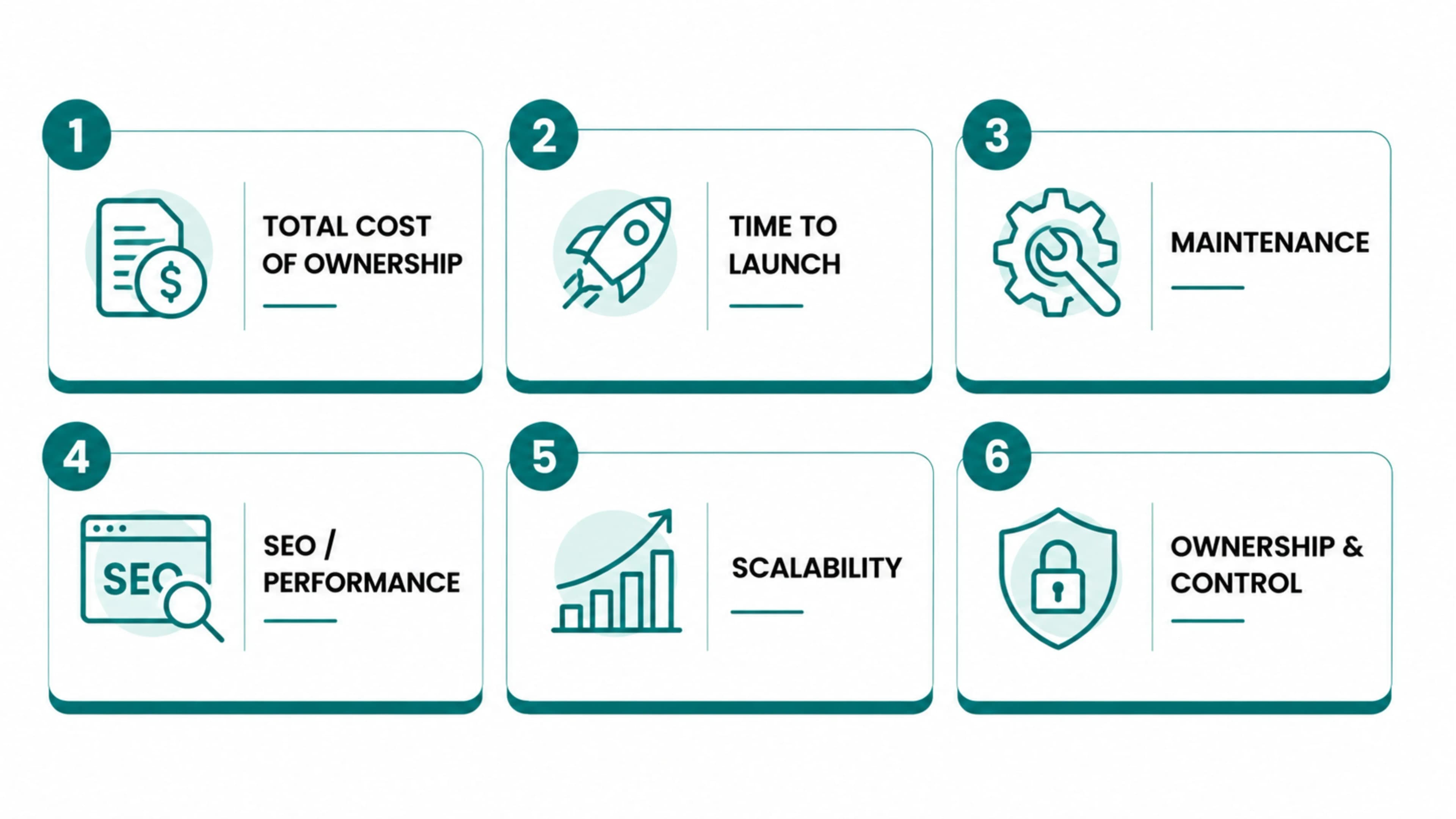
The 6 Criteria That Actually Decide Your Website Platform
The right platform should make the business easier to run, not create another technical problem to manage. Before comparing Shopify vs. WordPress vs. a custom website, evaluate the decision against six things that will matter long after launch.
1. Total cost of ownership
Don't compare only the development quote.
A website has hosting, software, apps, plugins, maintenance, security, development, analytics, SEO, integrations & redesign costs. A platform that is cheaper to build can become considerably more expensive to maintain.
2. Time to launch
If you're launching a new business or testing a product, spending six months building infrastructure before proving demand may be a terrible use of capital.
Speed has economic value.
3. Who will maintain it?
This question gets ignored surprisingly often.
Someone will eventually need to update the site, fix bugs, manage integrations, patch vulnerabilities, improve performance & make changes requested by marketing.
If nobody on your team can do that, the "cheap" website may not remain cheap.
4. SEO and performance control
You need enough control to manage the things that actually affect organic visibility: information architecture, metadata, internal linking, structured data, indexation, page experience & content.
But more control is not automatically better.
Having the ability to change everything also means having the ability to break everything.
5. Scalability and flexibility
Ask what the business needs to become, not just what it needs today.
Will you add multiple product lines? International markets? B2B functionality? Complex integrations? Personalization? A marketplace? A customer portal?
The answer can change the platform decision.
6. Ownership and lock-in
Finally, understand what you actually own.
There is a major difference between owning your code, content & data and operating inside a hosted platform with its own rules and constraints.
Neither model is inherently wrong. You just need to understand the trade-off before committing.
Shopify: The Best Choice When Selling Is the Priority
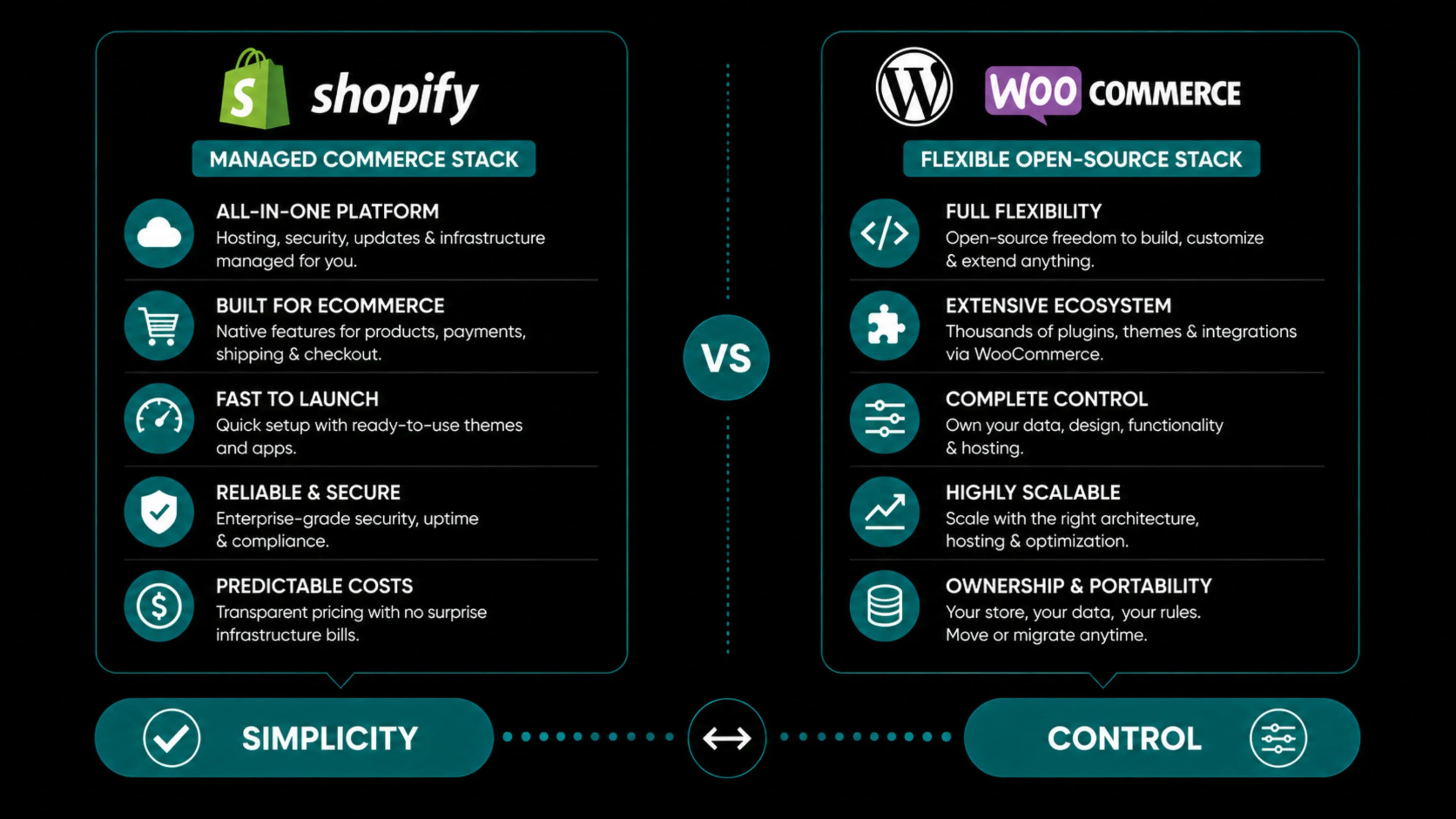
Shopify is often the easiest platform to recommend when the website has one primary job: sell products online.
It is purpose-built for ecommerce, so you don't have to assemble the entire commerce infrastructure yourself. Hosting, checkout, store administration, payments, product management & a large ecosystem of extensions are already built into the platform.
That matters.
If you're launching a new product line, I'd rather see you spend your time on pricing, merchandising, acquisition & retention than debugging a checkout integration.
Shopify's scale is also worth putting into perspective. As of August 2026, W3Techs reports Shopify is used by 5.3% of all websites it measures, representing 7.7% of websites whose CMS is known. WordPress remains considerably larger, but Shopify's presence shows how significant hosted commerce has become.
Strengths: Simplicity Without Starting From Scratch
Shopify's biggest advantage is operational simplicity.
You can launch relatively quickly, use established themes and apps, manage products without relying on developers for every change, and run on infrastructure designed specifically for ecommerce.
For a product-first business, that is a powerful combination.
Shopify has also become much more capable at the enterprise end. Shopify Plus supports advanced checkout customization, B2B functionality, expansion stores & additional APIs, so the old idea that Shopify is only suitable for small stores no longer holds up.
Limitations: Convenience Comes With Trade-Offs
The trade-off is control.
You are operating inside Shopify's ecosystem. That means accepting platform rules, plan limitations, and an ongoing cost structure. Third-party transaction fees can apply when merchants use external payment providers, while some advanced checkout capabilities are limited to Shopify Plus.
Apps can also quietly become a problem.
I've seen businesses treat every new requirement as a reason to install another app. That works until there are 25 apps, overlapping functionality, subscription costs, extra scripts affecting performance, and no one knows which app is responsible for what.
My rule is simple: use Shopify because it reduces complexity, not because it gives you another way to accumulate it.
Best Fit: Product-First Ecommerce Businesses
Shopify makes the most sense if you're launching or validating a store, need a relatively fast route to market & care more about selling efficiently than owning every layer of the technology.
I'd be more cautious when the business depends on highly unusual workflows that don't fit Shopify's architecture.
Even then, don't jump straight to custom development.
First, understand the requirement. Then choose the simplest platform that can handle it.
WordPress: When Content, SEO, and Control Matter More
WordPress is a very different proposition from Shopify.
Where Shopify starts with commerce, WordPress starts with a flexible publishing and content-management environment. That distinction matters when the website needs to do more than sell products.
If your business is content-led, whether that means publishing, education, professional services, media, thought leadership, or lead generation, WordPress can offer a level of control that makes sense.
And the ecosystem is substantial. According to W3Techs, 40.7% of all websites use WordPress, giving it a 58.9% share among websites using a monitored CMS as of August 31, 2026.
That doesn't make WordPress automatically better. It does show how mature and established the platform has become.
Strengths: Flexibility and Control
WordPress gives you significant control over content structure, templates, hosting, plugins, integrations, and the underlying code.
For SEO-led businesses, that flexibility can be valuable. You can build information architecture around how people search, create customized landing pages and taxonomies, and implement technical changes without working around the constraints of a commerce platform.
With WooCommerce, that flexibility extends into ecommerce. You retain control over the code, database, hosting environment, and broader technology stack rather than relying entirely on a single hosted commerce platform.
That level of ownership can matter as the business becomes more complex.
Limitations: Control Comes With Responsibility
This is where some WordPress pitches become misleading.
"WordPress is free" is technically true, but it is a poor way to estimate the actual cost of running a WordPress website.
Hosting, development, premium plugins, security, backups, updates, and ongoing maintenance all add up. And when a website relies on a large or poorly managed plugin stack, fixing those dependencies later can become expensive.
The more customized the installation becomes, the more technical expertise it requires. Someone needs to understand updates, security, plugin conflicts, performance, backups, and technical SEO.
Otherwise, flexibility quickly becomes technical debt.
Best Fit: Content-Led and SEO-Driven Businesses
I'd consider WordPress when:
- Organic search and content are central to growth
- You need significant control over information architecture
- Your website has complex publishing requirements
- You need extensive integrations or customization
- You want greater ownership of the underlying environment
- Ecommerce exists, but isn't the only thing the website needs to do
For ecommerce, WooCommerce can make sense when the store needs a level of customization and ownership that a hosted platform doesn't provide.
But I wouldn't choose WordPress simply because someone says it's "better for SEO."
That isn't how SEO works.
A well-built Shopify site can outperform a badly built WordPress site. What matters more is the quality of the architecture, content, performance, technical execution, and ongoing optimization.
Custom Development: When You Actually Need It
Custom development is probably the most romanticized option of the three.
You hear phrases like “complete control,” “unlimited scalability,” and “built exactly for your business.” All of that can be true. It can also be a spectacular waste of money.
Custom development makes sense when your requirements genuinely go beyond what existing platforms can handle efficiently. That might mean a highly specialized workflow, complex product configurators, proprietary customer experiences, unusual business logic, deep integrations with internal systems, or a website that is effectively becoming a software product.
The important word is requirement, not preference.
If the reason is simply “we want something unique,” dig deeper. What actually needs to be unique? Could Shopify or WordPress handle 90% of it? And does that remaining 10% justify the additional development, maintenance, and operational complexity?
There's also a question that gets overlooked: who owns the system after launch?
Strengths: Maximum Control and Flexibility
Custom development gives you control over the architecture, functionality, integrations, performance & user experience.
That matters when the business has requirements that don't fit neatly into an existing platform. You can build workflows around the way the business actually operates rather than adapting operations to the limitations of a CMS.
It also gives you greater freedom over the technology stack. You decide how the system is structured, what it integrates with & how it evolves as requirements change.
For businesses with genuinely unusual technical needs, that flexibility can justify the additional investment.
Limitations: You Own the Complexity
The same control that makes custom development attractive is also its biggest risk.
Development costs are higher. Launch timelines are longer. Ongoing maintenance requires technical expertise. And poor architectural decisions can create technical debt that becomes increasingly expensive to fix.
There's also no platform provider managing the underlying system for you. Security updates, infrastructure, bugs, integrations, performance & future development become your responsibility.
A custom website isn't simply more expensive to build.
It can be more expensive to own.
Best Fit: Businesses With Genuine Technical Requirements
Custom development becomes easier to justify when your workflows are genuinely unique, off-the-shelf platforms create material operational limitations, or the website is becoming more like a software product than a conventional business site.
It also makes sense when you have the budget and technical capability to support the system long term.
If you don't have someone accountable for that technical ownership, I'd be cautious.
The best custom website isn't the one with the most features. It's the one where the additional complexity solves a problem that simpler platforms genuinely cannot.
The Platform Decision in One Table
| Shopify | WordPress / WooCommerce | Custom | |
|---|---|---|---|
| Best for | Ecommerce-first businesses | Content, SEO & flexible sites | Unique requirements |
| Launch speed | Fast | Moderate | Slowest |
| Upfront cost | Lower | Low–moderate | Highest |
| Ongoing cost | Platform + apps + development | Hosting + plugins + maintenance | Engineering + infrastructure |
| SEO control | Strong, with platform constraints | Very high | Very high |
| Scalability | Strong | Strong with good architecture | Highest potential |
| Maintenance | Lower | Moderate–high | High |
| Ownership | Hosted platform | You own the environment | You own the system |
| Lock-in | Higher | Lower | Depends on architecture |
The Second Decision: Who Should Actually Build Your Website?
Choosing the platform is only half the decision.
I've seen businesses spend weeks debating Shopify versus WordPress, then hand the project to the cheapest developer they can find. That's often where the real problems begin. A great platform with poor implementation is still a poor website.
The better question is: what level of expertise does this website actually require?
Freelancer: The Right Choice for a Defined Project
For many small businesses, a freelancer is the most sensible option.
If you're launching a straightforward Shopify store, rebuilding a five-page service website, or creating a simple WordPress site, you may not need an agency with strategists, designers, developers, SEO specialists & project managers. You may simply need someone who is very good at the job.
The limitation appears when the project becomes larger than one person's skill set. A developer who is excellent at Shopify may not be equally strong in technical SEO, UX, CRO, analytics, or complex integrations. That's fine, as long as you understand what you're hiring them to do.
Best fit: smaller, well-defined projects with straightforward requirements.
Agency: When the Website Is a Growth Asset
An agency becomes more useful when the website isn't simply something you need to launch. It's something you expect to grow the business.
A strong agency can bring strategy, UX, design, development, SEO, content, analytics & conversion expertise into one project. That matters because websites rarely fail because someone couldn't write the code. They fail because nobody thought carefully enough about what the website needed to accomplish.
I've seen beautiful websites with almost no organic visibility, technically excellent websites with confusing messaging & fast websites that still convert poorly. The agency advantage isn't simply having more people. It's having the right expertise involved at the right stage.
The downside is straightforward: you'll usually pay more. If you don't need that additional capability, don't pay for it.
In-House: When the Website Becomes Core Infrastructure
An internal team makes sense when the website requires continuous development rather than a one-time build.
For a large ecommerce operation, SaaS platform, marketplace, or digital product with frequent releases, having developers internally can create real advantages. The team understands the business, priorities can shift quickly, and product, marketing, engineering & analytics can work closely together.
But you're rarely hiring just one person. Depending on the operation, you may eventually need development, design, QA, DevOps, product, SEO, and analytics expertise.
If you need that capability every day, it's an investment. If you're rebuilding the website once every three years, it may simply be unnecessary overhead.
Match the Team to the Complexity
This is the framework I come back to most often:
| Business situation | Platform I'd consider | Team I'd consider |
|---|---|---|
| New product-based business | Shopify | Freelancer/specialist |
| Small service business | WordPress | Freelancer |
| SEO/content-led business | WordPress | Specialist agency |
| Growing ecommerce brand | Shopify / WooCommerce | Specialist agency |
| Complex ecommerce operation | Shopify Plus / WooCommerce / custom | Agency + internal technical owner |
| SaaS or digital product | Custom / specialized stack | In-house/specialist agency |
| Highly unusual workflow | Custom | Agency / in-house engineering |
These aren't rules. They're starting points. The right combination depends on what you're actually trying to build.
Stop Comparing Development Quotes
This is where website projects routinely go wrong.
A business receives three proposals:
Shopify: $8,000
WordPress: $12,000
Custom: $40,000
The obvious choice seems to be Shopify. But those numbers don't tell you what the website will actually cost. Look at the total cost of ownership instead.
For Shopify, factor in the platform, apps, themes, development, payment-related costs, and maintenance. For WordPress, consider hosting, plugins, security, updates, and ongoing development. For custom, include infrastructure, engineering, monitoring, maintenance, and future feature work.
Then look at the cost nobody puts in the proposal: the cost of changing the website later.
If every landing page needs a developer, that's a cost. If your SEO team can't make important changes without engineering support, that's a cost. If a migration becomes a six-month project because the original architecture couldn't evolve, that's an even bigger one.
The cheapest website to build isn't necessarily the cheapest website to own.
A Simple Decision Framework
The platform decision becomes much easier when you stop comparing features and start looking at the business in front of you. Here's the shortcut I'd use.
If You're Validating an Ecommerce Idea
Choose Shopify with a freelancer or a small specialist team. You need to get to market, test demand, and learn what customers actually want before investing heavily in infrastructure.
If SEO and Content Drive Acquisition
Choose WordPress with an SEO-focused agency or an experienced freelancer. When organic search is central to growth, content architecture, technical SEO, and publishing flexibility become more important.
If You're Scaling a Product-First Ecommerce Business
Choose Shopify with an agency or a capable internal team. Once the store becomes a serious revenue engine, you may need SEO, CRO, analytics, development, content, and merchandising working together.
If You Have Complex Business Logic
Consider custom development with an agency, an internal engineering team, or both. This makes sense when proprietary workflows, integrations, portals, configurators, or product functionality cannot be handled efficiently by an existing platform.
If You Already Have a Strong Technical Team
Use it. There is little reason to bring in an agency simply because agencies are perceived as more experienced. If your internal team has the skills, bandwidth, and ownership to build and maintain the website, keeping the work in-house may be the better decision.
If You Need Specialists but Not Full-Time Hires
Consider an agency. This is particularly useful when the website requires several disciplines at once, such as SEO, development, UX, CRO, content, and analytics, but hiring each specialist permanently doesn't make economic sense.
The simplest rule I use is this: if a freelancer can solve the problem, use one. If your internal team can own it, keep it in-house. If the problem requires several specialists working together, bring in an agency.
The goal isn't to assemble the biggest team or build the most sophisticated website. It is to build the right amount of technology for the business you actually have.
Common Mistakes I Would Avoid
Most website problems don't come from choosing the "wrong" platform. They come from making a reasonable decision for the wrong reason, or failing to think beyond launch.
These are the mistakes I'd watch for before approving a platform, budget, or development team.
Building Custom Too Early
This is probably the most expensive mistake. If the business model hasn't been proven, there's little value in spending heavily on infrastructure built around assumptions. Prove the business first, then invest in technology based on what you've actually learned.
Choosing a Platform Around the Developer
Your developer's expertise matters, but your business requirements matter more. A WordPress developer will naturally favor WordPress, just as a Shopify specialist will favor Shopify. Start with what the business needs, then choose the platform and the person who can deliver it.
Looking Only at the Development Quote
The initial proposal is only part of the cost. Factor in maintenance, updates, security, optimization, integrations, and future changes. A $10,000 website that becomes expensive to maintain can easily cost more than a $20,000 website that was built properly from the start.
Treating SEO as a Post-Launch Task
For businesses that rely on organic acquisition, this can be particularly costly. Changing URL structures, navigation, templates, internal linking, or category architecture after launch is harder than getting them right from the beginning. SEO should influence the architecture, not become a cleanup exercise afterward.
Hiring for Price Instead of the Problem
The cheapest freelancer isn't always the best choice, and the most expensive agency isn't automatically the safest. Match the team to the complexity: if a good freelancer can solve it, use one. If your internal team can own it, keep it in-house. If the work requires multiple specialists, bring in an agency.
The goal isn't to build the biggest team or the most sophisticated website. It's to build the right amount of technology for the business you actually have.
FAQ: Shopify vs. WordPress vs. Custom
1. Is Shopify or WordPress better for SEO?
Neither is inherently better. WordPress generally gives you greater technical and content flexibility, while Shopify provides a more managed environment with less infrastructure to maintain. Both can perform well when architecture, content, performance, and technical SEO are handled properly.
2. Is a custom website worth it for a small business?
Usually, no. If your requirements can be handled effectively by Shopify or WordPress, custom development often adds cost and maintenance without creating enough additional business value.
Custom becomes more compelling when you have genuinely unique workflows or functionality that off-the-shelf platforms cannot handle efficiently.
3. Should I hire an agency, freelancer, or build in-house?
It depends on complexity and how long you expect to need the capability. A freelancer works well for a defined project. An agency makes sense when multiple specialist skills are required. An in-house team becomes attractive when website development is an ongoing, business-critical function.
4. How much does each option really cost over three years?
There isn't a universal number. The useful comparison is total cost of ownership: development, hosting or platform fees, apps and plugins, maintenance, security, development support, integrations, and future changes.
A lower upfront quote does not automatically mean lower three-year cost.
5. Which option is fastest to launch?
Generally, Shopify is the fastest for ecommerce. WordPress can also launch quickly when the scope is straightforward. Custom development typically takes the longest because you're building more of the underlying system yourself.
6. When should I build a custom website?
When the business has a requirement that existing platforms cannot handle efficiently — and that requirement is important enough to justify the additional development and ongoing engineering cost. If the only reason is "we want something unique," I'd keep asking questions.
The Answer Is Usually Simpler Than We Make It
After all the platform comparisons, technical discussions, and vendor presentations, I keep coming back to one principle: don't choose the most powerful website. Choose the simplest one that can support the business you're building.
If Shopify solves the problem, use Shopify. If WordPress gives you the control you need, use WordPress. If your business genuinely requires custom development, build custom. The same logic applies to the team behind it. A freelancer isn't a lesser choice than an agency, and an agency isn't automatically better than an internal team. What matters is whether the team has the right capability for the complexity involved.
The real mistake is paying for complexity you don't need, or choosing a platform and team that can't support where the business is heading. The website should make growth easier, not become another problem the business has to manage.
The best website isn't the one with the most technology behind it. It's the one that makes the business easier to grow.
Table of Contents
- Key Takeaways
- The 6 Criteria That Actually Decide Your Website Platform
- Shopify: The Best Choice When Selling Is the Priority
- WordPress: When Content, SEO, and Control Matter More
- Custom Development: When You Actually Need It
- The Platform Decision in One Table
- The Second Decision: Who Should Actually Build Your Website?
- Match the Team to the Complexity
- Stop Comparing Development Quotes
- A Simple Decision Framework
- Common Mistakes I Would Avoid
- FAQ: Shopify vs. WordPress vs. Custom
- The Answer Is Usually Simpler Than We Make It
- Common questions
Let's Grow Your Business
- Top 3 competitor keyword rankings mapped against yours
- Keyword gap report — where they rank and you don't
- Backlink authority comparison
- Priority actions — ranked by impact and achievability
Let's Grow Your Business
- Top 3 competitor keyword rankings mapped against yours
- Keyword gap report — where they rank and you don't
- Backlink authority comparison
- Priority actions — ranked by impact and achievability
Let's Grow Your Business
- Top 3 competitor keyword rankings mapped against yours
- Keyword gap report — where they rank and you don't
- Backlink authority comparison
- Priority actions — ranked by impact and achievability
Let's Grow Your Business
- Top 3 competitor keyword rankings mapped against yours
- Keyword gap report — where they rank and you don't
- Backlink authority comparison
- Priority actions — ranked by impact and achievability
Common questions
If something's not covered here, call us or use the audit form — we'll answer directly.
If something's not covered here, call us or use the audit form — we'll answer directly.